Why are the parentheses in such an awkward place (Shift+8, Shift+9, or Shift+0)? I don't program Lisp, but why don't Lisp keyboards put parentheses in a more convenient place?
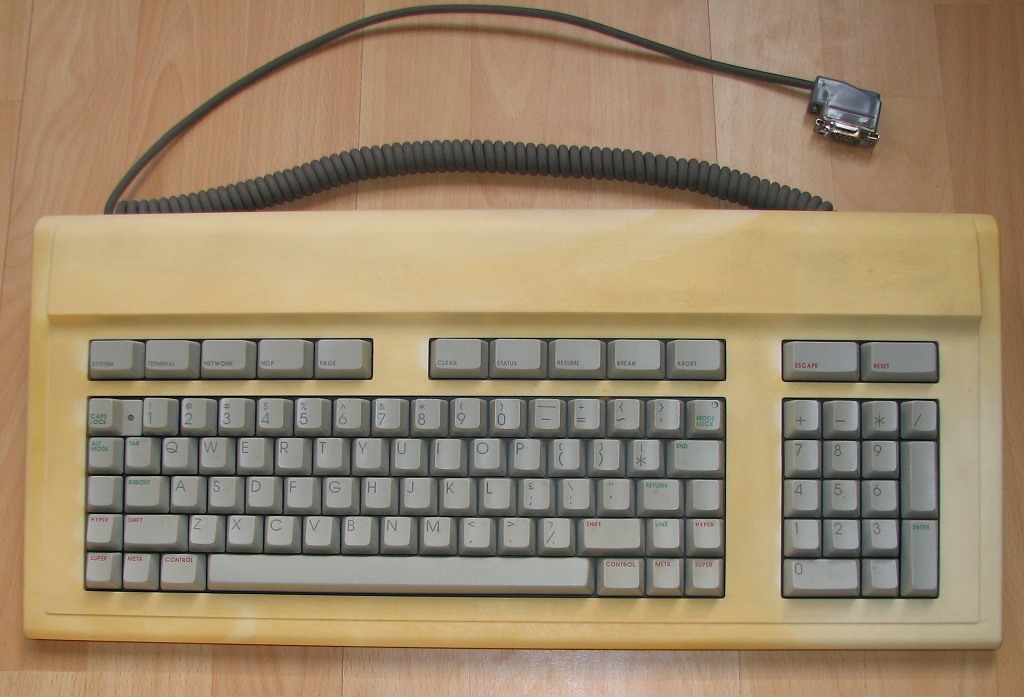
Also, there are quite a few modifier keys ("Function", "Super", "Hyper", "Rub Out", etc)? Anyone know the purpose of all of them?
Note that all of these keyboards except the Knight have a second pair of parens: the unshifted characters on the keys just right of P, where the PC/Windows layouts have square brackets. (In turn forcing square brackets into the shifted position, and curly braces onto other keys.) This helps to balance the wear on the keys. ;)
Super and Hyper are modifier keys for Emacs and to let you type things like Greek letters and math/logic symbols easily (you can see math symbols on the Space Cadet and Knight keyboards).
Rubout is just backspace. IMO having it next to the 'a' is a really good position; I rebind my Caps Lock key to Backspace on my machines. It's more convenient than the Sun-style "Control as Caps Lock" layout.
> Rubout is just backspace. IMO having it next to the 'a' is a really good position; I rebind my Caps Lock key to Backspace on my machines. It's more convenient than the Sun-style "Control as Caps Lock" layout.
One of my favorite keyboards of all time had the spacebar split in two. Because I learned typing such that I always use the right thumb to press the spacebar, the left half of the spacebar made a very good backspace. I've often wished I could find more good keyboards like that.
The Kinesis Advantage is a bit like that: although they're not a usual spacebar shape, space is under the right thumb, and backspace is under the left thumb.
Almost right. Super and Hyper are pure modifiers and can be combined with any key. On the original Space Cadet keyboard, Top and Front were used to type Greek letters and symbols. (Not all of the symbols shown on the keys could actually be entered, however.) The later Symbolics keyboards had a Symbol key for this purpose.
Depending on your keyboard layout, the "Menu" key makes a good Hyper, and if you've set up Caps Lock as an extra Ctrl key, you can remap your left Ctrl key to something useful.
You can also separate Alt and Meta to different keys.
A quick emacs session will show you whether your new modifier keys are working as intended.
IIRC you can do similar for the (text-mode) Linux console as well.
Jokes aside, would it not create a short pause before and after stepping on the pedal in order to synchronize with fingers typing, and thus slow you down?
It looks like the Racal-Norsk KPS-10 Lisp Prototype has them in a more convenient place, as well as on 9 and 0: http://webwit.nl/input/kps/1.jpg
I like that idea, even though I don't do much Lisp. Parentheses are still used everywhere in programming and are always awkward. Maybe I'll experiment with remapping some keys if I can figure out which ones to sacrifice.
I took on online file of the Dvorak keyboard layout and modded it so the parens would be where the tags in Dvorak are (shift-W and shift-E on Qwerty). I made other mods too. It's really comfy.
You can build an adapter to make the Symbolics keyboards USB. I've got the parts and the keyboard, but haven't taken the time to re-compile the code for the Teensy 2.0 yet.
I actually have the guts of an original Space Cadet keyboard. By "guts" I mean it's just the part made by Micro Switch: the PC card with all keyswitches and keys and all wiring, but no microcontroller and no case.
Nor, alas, do I have the source for the program the microcontroller ran. (I'm pretty sure it was an 8748.) Lacking that, I think it would be pretty hard to get the thing to work.
I have wanted a space cadet keyboard for close to 10 years now. Not only because it's really cool but because I live my life inside Emacs and this is the ultimate Emacs keyboard. Should clear up my Emacs finger pains in no time, not to speak of modifier key heaven.
I really wish there was a company that would produce replicas of these keyboards which used USB. If I thought there was any chance of it being successful, I would open said business immediately. But alas, I don't think anyone wants to use these monstrosities anymore.
There are tons of niche keyboard producers around. Most of them would probably be willing to work on custom layouts if you can show pre-orders. Here are some that produce quality mechanical keyboards:
The problem is that the original Knight keyboards and first coupla generations of LispM keyboards were made with full mechanical Hall-effect switches by Microswitch, a Honeywell subsidiary. There were never more wonderful keys crafted by the hand of men.
Sadly, once Microswitch stopped making these, even on a custom basis (they lived on for a long time as ATM keys, etc., since they were certified for millions of up/down cycles), that particular silken feel has been lost.
I still have my 3rd generation LLNL Microswitch keyboard, commissioned by the MIT/Stanford folks working on the S1 supercomputer.
Even this 3rd generation can't match the original Knight keyboard feel.


Also, there are quite a few modifier keys ("Function", "Super", "Hyper", "Rub Out", etc)? Anyone know the purpose of all of them?